
How to install The Architect
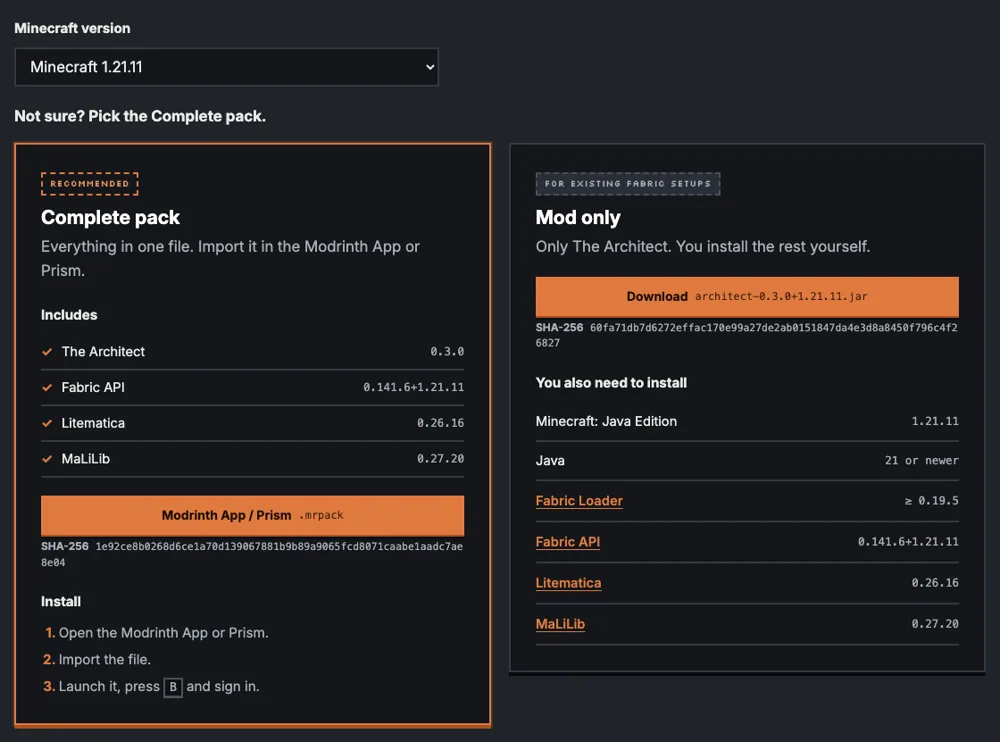
The Architect is a Fabric mod for Minecraft Java Edition. It shows its designs with Litematica. So you need four things for the same Minecraft version: Fabric Loader, Fabric API, Litematica and MaLiLib. The complete pack has all of them in one download.
Pick your Minecraft version
The Architect is built for Minecraft 1.21 up to 1.21.11, plus 26.1, 26.1.1, 26.1.2, 26.2 and 26.3. Each version has its own download, so pick the one that matches your game. The compatibility page lists the exact Fabric API, Litematica and MaLiLib builds for each. Versions 26.x need Java 25; 1.21.x needs Java 21.
Choose the complete pack or the jar
- Complete pack (
.mrpack): the easiest way. It contains Minecraft, Fabric, Fabric API, Litematica, MaLiLib and The Architect. Import it in the Modrinth App or Prism Launcher and you are done. - Mod jar only: for players who already run Fabric with Litematica and MaLiLib. Put the jar in your
modsfolder next to those. Use the same Minecraft version, and make sure Fabric API, Litematica and MaLiLib are installed too.
Both are on the download section of the home page, with a SHA-256 checksum for each file.
Install with the complete pack
- Download the
.mrpackfor your Minecraft version from the download section. - In the Modrinth App choose Create instance, then Import from file. In Prism Launcher choose Add Instance, then Import. Pick the
.mrpack. - Launch the new instance once. The first start takes a little longer while Minecraft loads the mods.
Other launchers that run Fabric mods also work, including the CurseForge app and the official Minecraft launcher with Fabric installed. Those use the jar.
Install with the jar
- Install Fabric Loader for your Minecraft version, for example with the Fabric installer.
- Download Fabric API, Litematica and MaLiLib for the same Minecraft version from Modrinth.
- Put those three and The Architect jar in the
modsfolder of your instance.
If Litematica is missing or too old, The Architect tells you in game that ghosts are off.
Check that it works
Join a world and press B, the default key for Architect. The terminal opens. You can rebind the key in Minecraft's key binds under Architect. Next you log in. The first build guide shows how.
Servers and age
Everything runs on your own computer, so nothing is installed on the server. The Architect works in singleplayer, on Aternos and on other servers. You need your own copy of Minecraft: Java Edition, and you must be 15 or older.